To delete all data stored on the device ONLY (administrator users, shares, copies made and PIN set) you can perform a reset which returns the device to factory settings.
To reset the device, simply press the button inside SOLO for 10 seconds, then the LED next to it will start to flash rapidly, the procedure may take a few minutes.
Once the procedure is complete, the LED returns to flashing regularly and slowly.
Button to press: 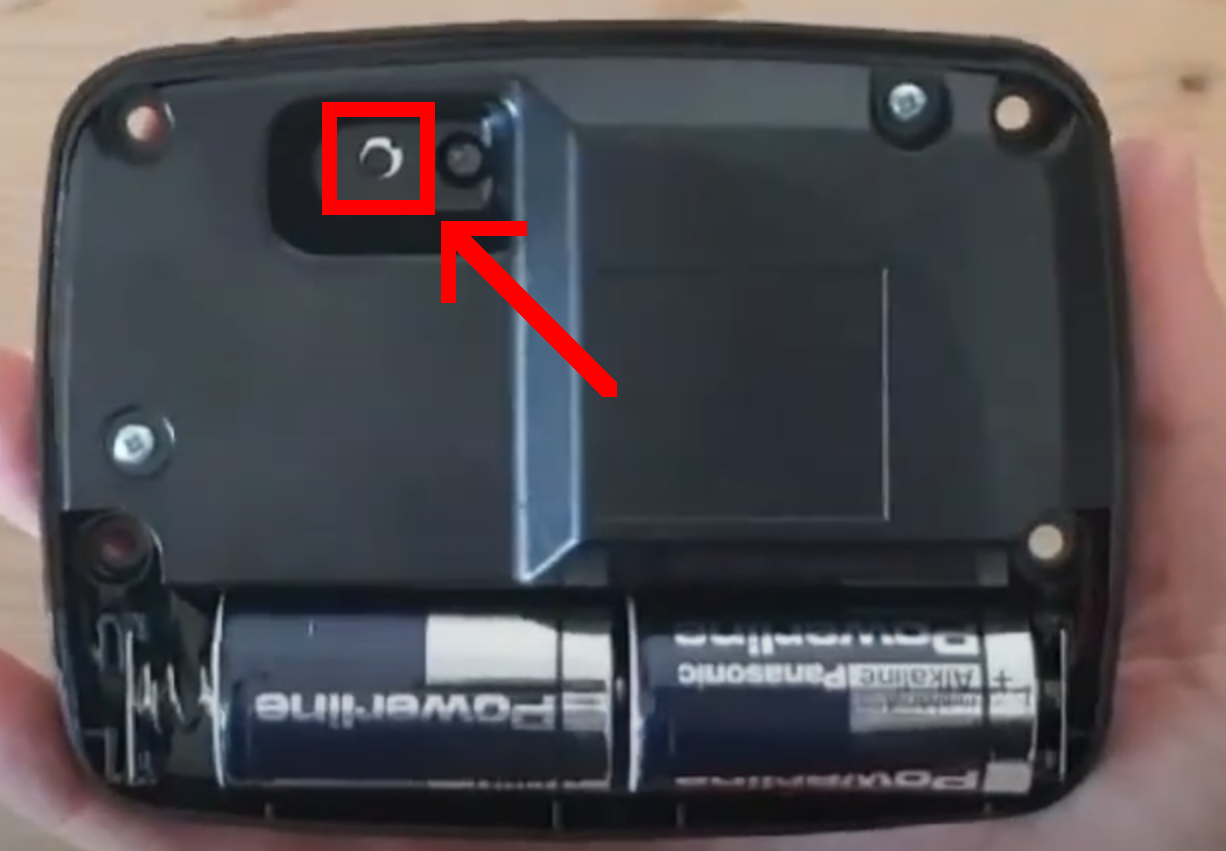
To open SOLO, simply unscrew the 4 screws on the back of the device and open the device.
SOLO is weatherproof, so to ensure that water does not enter the device there is a rubber at the point where the two pieces of the plastic shell come into contact, the rubber creates enough friction when opening, so we recommend using some tool to open the shell, such as a flat-head screwdriver, and pry evenly in the corners in the middle of the shells to separate them
Here is a demo video: https://youtu.be/sv7pwPTfb6I