To complete the copy of your remote control:
- Start copying until you reach the "Check Operation" screen.
- Press the menu button at the top right to enter manual recording as shown in the image below
- Move both sliders shown to 1 second
- Locate the 3 buttons used for menu navigation: "+", "-" and "OK"
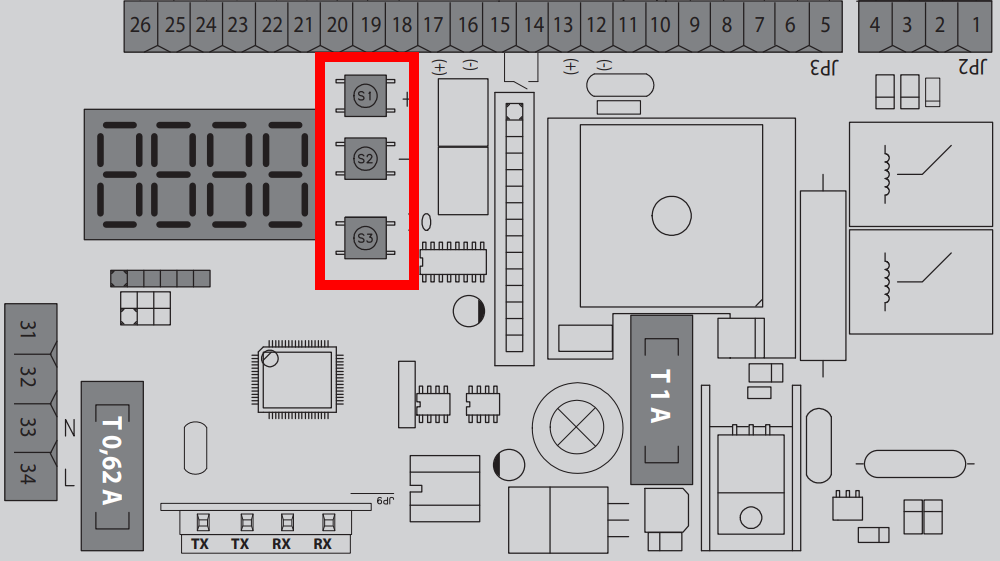
5. Press the "OK" button, if "Param" does not appear on the display, press "OK" again
6. Use the "+" and "-" buttons to navigate to the "Radio" item and press "OK"
7. Use the "+" and "-" buttons to get to the "Add start" item and press "OK"
8. The message "Hidden button" will appear on the control unit, in the 1Control app press the "Transmit source code" button and wait 2 seconds
9. When the message "Key desired" appears on the control unit, press the "Transmit opening signal" button on the app and wait 2 seconds
10. The display should show "OK" followed by a number
11. Wait approximately one minute for the control unit to exit programming mode
12. Press the "Next" button at the bottom of the app
13. Test the storage operation using the "Open/Close" button